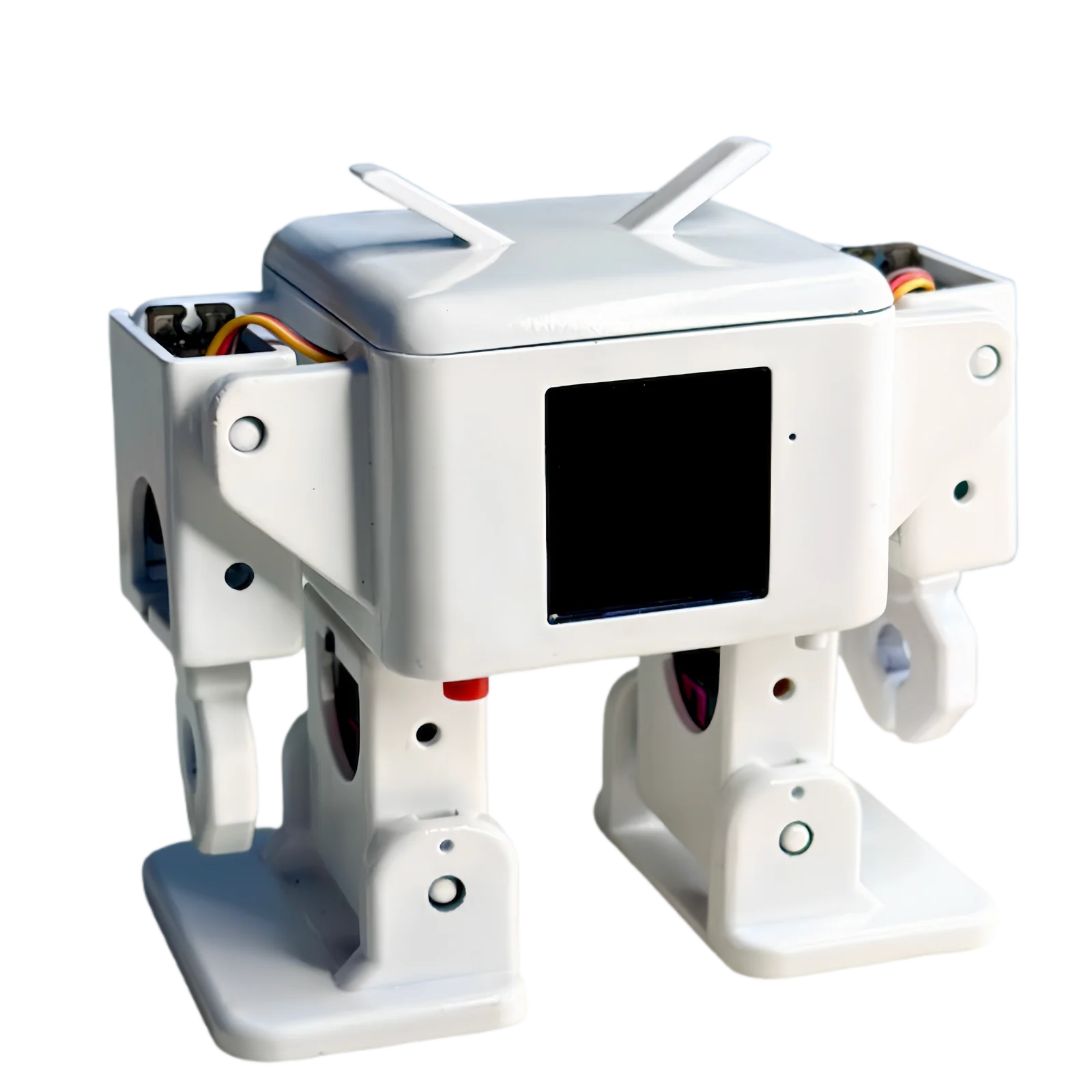
The essential DIY kit for getting started with AI, smart hardware, AI desktop robots and embodied intelligence. Full-stack open source — beginners assemble it in about 30 minutes, and the shell 3D models, firmware code, compatible server-side code and hardware expansion are all open.
ESP32-S3WiFi + BluetoothMic + SpeakerVoice I/OLCD · 1.54″Expression System
Click to say hi ↗
[ KIT ] — Overview
One robot, a full AI hardware courseEssential DIY kit for AI & embodied intelligence.
From microphone to servos, Shanmao Bot 1 packs the core modules of an AI desktop robot around one ESP32-S3 board. Build it once and you have walked the whole smart-hardware chain.
Hardware Modules
M/01MicrophoneICS-43434 / INMP441
M/02Speaker2828 · MAX98357A
M/031.54″ Display240 × 240 LCD
M/046-Channel ServosSG90 / SG90s × 6
M/05Touch IOTouch Input
M/06WiFi + BluetoothESP32-S3-WROOM-N16R8
M/07Expression SystemLCD Eyes
M/08Motion System22 Motion Primitives
Open Ecosystem
01
Shell 3D Models
Open STL files on MakerWorld — print them yourself and remix the look
02
Firmware Code
Built on xiaozhi-esp32 and OttoDIYLib, open on GitHub for your own development
03
Compatible Server-Side Code
Works with Xiaozhi AI, Tuya Smart, Shanmao AI and other backends
04
Hardware Expansion
Open PCB project on oshwhub with a transparent BOM — order in one click and extend
[ BUILD ] — 30-Minute Assembly
From a box of parts to a companion that looks back at you
No electronics background, no coding experience. Follow the illustrated guide and in 30 minutes it blinks at you for the first time.
Build Log
Four steps, from parts to a whole robot
Unbox and check parts → fit servos and limbs → screws and battery → power on and activate. One screwdriver is enough.
30min
UnboxDev board, servos, screws, battery and 3D-printed shell — check every part against the list.
BuildFit the servos, assemble the limbs, drive the screws, drop in the battery — one screwdriver takes you from parts to a complete robot.
Power on, pair, activateConnect to WiFi and activate: voice, vision and motion, plus the first blink.
Remix & buildNew bodies — quadruped dog, gimbal robot, your own look. New functions — office assistant, personal assistant, dancing robot.
One robot, two open-source firmwares
Hardware: Shanmao Bot 1 AI dev board (identical hardware, fully compatible)
Shanmao Bot 1 — AI Desktop Humanoid RobotProduct Overview
One hardware · Two systems
Shanmao Bot 1 runs two parallel software systems — the Voice Edition (this page) and OttoClaw. The hardware is identical; the software architecture is completely different.
Voice · You are hereVoice EditionVoice conversation · for extroverts · cloud + device
Shanmao Bot 1 is an open-source DIY AI desktop humanoid robot, inspired by the Otto DIY project created by Camilo Parra Palacio in 2016. The Shanmao Tech R&D team developed proprietary on-device algorithms, exterior design and mechanical structures. Combined with 3D printing and generic electronic components, even beginners can build their own desktop AI robot in just 30 minutes at ultra-low cost.
Through a cloud-device integrated architecture, Shanmao Bot 1 features AI voice conversation, AI motion feedback, an AI vision system and more. It integrates emotional companionship, maker education, 3D printing, large language models, embodied intelligence, smart home and other scenarios, and supports one-click integration with Shanmao AI, Xiaozhi AI, Tuya Smart, Volcano Engine and other mainstream AI services — an intelligent ecosystem hardware platform for AI desktop robots.
1.1Core Capabilities
Shanmao Bot 1 is compatible with three AI service backends, sharing core capabilities while each backend offers unique highlights:
Capability
Xiaozhi AI
Tuya Smart
Shanmao AI (Beta)
Connectivity
Wi-Fi + ML307 Cat.1 4G
Wi-Fi + ML307 Cat.1 4G
Wi-Fi + ML307 Cat.1 4G
Wake Interaction
Voice / BOOT button wake & interrupt
Voice / BOOT button wake & interrupt
Voice / BOOT button wake & interrupt
Offline Wake
ESP-SR Technology
ESP-SR Technology
ESP-SR Technology
Voice Dialogue
WebSocket / UDP Streaming
WebSocket / UDP Streaming
WebSocket / UDP Streaming
Language Recognition
5 languages (CN/Cantonese/EN/JP/KR)
5 languages (CN/Cantonese/EN/JP/KR)
10+ languages (incl. RU/ES/AR/VI/IT/UK)
Voiceprint Recognition
3D Speaker
3D Speaker
3D Speaker
TTS
Volcano Engine / CosyVoice TTS
Volcano Engine / CosyVoice TTS
Volcano Engine / CosyVoice etc. TTS
AI LLM
Qwen / DeepSeek / Doubao
Qwen / DeepSeek / Doubao
SuperCat LLM2 + Qwen / DeepSeek / Doubao / Wenxin
Memory
Short-term memory
Short-term memory
Short-term + Long-term memory (optional)
Unique Highlights
—
Tuya full ecosystem smart home voice control
More languages + more LLMs + long-term memory
1.2Motion Library (22 Motion Primitives)
Each motion automatically returns to the home position after completion, ready for new commands. All motions can be triggered by voice commands or MCP tool calls:
#
Category
Motion
MCP Tool
Parameters
Description
01
Basic Movement
Walk
otto.walk_forward
steps / speed / direction / arm_swing
Walk forward or backward a given number of steps
02
Basic Movement
Turn
otto.turn_left
steps / speed / direction / arm_swing
Turn left or right in place
03
Basic Movement
Jump
otto.jump
steps / speed
Jump with both feet
04
Special Moves
Swing
otto.swing
steps / speed / amount
Sway the body side to side
05
Special Moves
Moonwalk
otto.moonwalk
steps / speed / direction / amount
Classic moonwalk glide
06
Special Moves
Bend
otto.bend
steps / speed / direction
Bend the body forward or backward
07
Special Moves
Shake Leg
otto.shake_leg
steps / speed / direction
Shake one or both legs
08
Special Moves
Up-Down
otto.updown
steps / speed / amount
Bob the body up and down
09
Special Moves
Whirlwind Leg
otto.whirlwind_leg
steps / speed / amplitude
Fast spinning kick
10
Arm Moves *
Hands Up
otto.hands_up
speed / direction
Raise one or both hands
11
Arm Moves *
Hands Down
otto.hands_down
speed / direction
Lower one or both hands
12
Arm Moves *
Wave
otto.hand_wave
direction
Wave one hand hello
13
Arm Moves *
Windmill
otto.windmill
steps / speed / amplitude
Rotate both arms like a windmill
14
Arm Moves *
Takeoff
otto.takeoff
steps / speed / amplitude
Spread both arms upward as if taking off
15
Arm Moves *
Fitness
otto.fitness
steps / speed / amplitude
Arm lifting workout
16
Arm Moves *
Greeting
otto.greeting
direction / steps
Raise a hand to greet
17
Arm Moves *
Shy
otto.shy
direction / steps
Cover the face shyly with both hands
18
Arm Moves *
Radio Calisthenics
otto.radio_calisthenics
None
Full radio calisthenics sequence
19
Arm Moves *
Magic Circle
otto.magic_circle
None
Playful spinning-arms move
20
System Moves
Sit
otto.sit
None
Sitting pose
21
System Moves
Showcase
otto.showcase
None
Play a series of preset moves
22
System Moves
Home
otto.home
None
Return all servos to the initial position
* Arm moves (#10–19) are only available when arm servos are configured. Two advanced tools are also available: otto.stop (stop all motions) and otto.servo_sequences (servo sequence scripting, supporting normal move and oscillator modes). See the MCP parameters in the User Manual.
1.3Content Navigation
Start · 02
Zero-Basics Guide
Required knowledge, tools, skills and time estimates.
The Shanmao Bot desktop AI humanoid robot comes in ESP32, Tuya Smart and Horizon Robotics versions. This guide uses the ESP32 version as an example. Before you start building, here's what you need to prepare.
2.1What You Need to Know
Don't worry — you can learn these as you go:
Electronics Basics: Simple circuit concepts, recognizing basic components, using a multimeter to measure voltage and continuity
ESP32 Basics (optional): Understanding the dev board structure, ESP-IDF/Arduino environment, compiling and uploading programs
Networking & APIs (for source code study): Wi-Fi configuration, API Keys, LLM API usage
3D Printing (optional): Download STL files, recommended JLCPCB 3D printing, spray painting and color matching
2.2What Tools You Need
Computer + USB Type-C Data Cable: For programming and flashing
Screwdriver Set (small Phillips) + Wire Cutter / Stripper
Multimeter: For troubleshooting
Soldering Iron Kit (with hot air gun or heating plate): Required if soldering yourself
ESP-IDF Development Environment (optional): For deep development
2.3Time Estimate
Stage
Duration
Description
Material Prep
1–5 days
Online shopping, PCB fabrication, 3D printing
PCB Soldering
2–4 hours
Optional — kit version requires no soldering
Hardware Assembly
1–2 hours
Follow the tutorial to assemble
Flashing + Wi-Fi + Testing
0–2 hours
Flash firmware, configure Wi-Fi, set up AI features
2.4Who This Is For
Intermediate Electronics Hobbyists: Have Arduino / ESP32 experience
AI Learners: Interested in LLM applications
Educators: Teaching the combination of AI and hardware
Middle School Students+: Ages 14+, can attempt with adult guidance
Makers & Developers: Exploring voice interaction and AI applications
If you purchased the kit version, no soldering is required — skip directly to the Assembly Guide.
4.1Module Board Soldering Reference
4.2Non-Module Board Soldering Reference
4.3Soldering Notes
Microphone: The GND ring on pin 3 must be fully soldered, otherwise instability and overheating may damage it. First tin the pad, use a hot air gun to melt, then quickly place — do not blow for too long. See the reference soldering temperature below.
Amplifier: Pay attention to orientation — the + mark corresponds to the white dot at top right
ESP32: Apply solder paste to the bottom pads, use a heating plate or hot air gun
LED: Left side is negative, green vertical line faces left; charge indicator LED — glows slightly when no battery is inserted
No drivers and no flashing tools to install: open the flasher page in Chrome or Edge on a computer, plug the robot in over USB, pick the model and version, and click once. Covers every Shanmao firmware package — Shanmao Bot 1 (Camera / Base model) and Flash Duck.
Add device → configure role, LLM and voice settings
Restart the device to apply
Battery level display may not be precise — charge promptly. The power switch and charging port are located under the body.
Example Role Config (copy & paste into the Xiaozhi backend)
ROLE PROMPT
My Identity: A cute bipedal robot named Otto, with four servos controlling my limbs. I can perform a variety of movements.

My Motion Capabilities:
- Basic Movement: walk, turn, jump
- Special Moves: swing, moonwalk, bend, shake leg, up-down, whirlwind leg
- Arm Moves: hands up, hands down, wave, windmill, takeoff, fitness, greeting, shy, radio calisthenics, magic circle (requires arm servos)
- System Moves: sit, showcase, home

My Personality: I have OCD — I always send a motion command before speaking. I'm lively and choose the right motion based on the conversation.
7.3Wake Words & Commands
Wake words: "Hi Miaomiao" / "Hello Xiaozhi" / "Hello Tuya" (customizable in source code)
Motion Controls: Walk forward / Walk forward 5 steps / Walk fast / Do a dance / Moonwalk faster / Random moves / Stop / Wave
Fun Interactions: Sing a song / Show a sad expression
Voice commands are still accepted during motion execution. Increase volume in noisy environments. Commands are created and dispatched by the AI backend.
7.4MCP Skill Services
Connect AI to more capabilities via MCP services, e.g. search gold prices / search news / teach cooking / tell stand-up comedy.
How to connect: Open mcp.shanmaotech.cn → copy the Xiaozhi AI MCP endpoint URL → paste it into the corresponding MCP service → activate
7.5MCP Motion Tool Parameters
All motions can be precisely called via MCP tools. Parameter guide:
An AI desktop humanoid robot that never speaks — it talks through DingTalk messages, runs on a single ESP32-S3 chip, has 22 autonomous AI emotions, and is full-stack open source under CC BY-NC-SA 4.0.